
Introduction
Nothing ruins a live football match, blockbuster movie, IPTV Buffering Problems or favourite TV show faster than constant buffering. Whether you’re using an IPTV service on a Firestick, Android TV, Smart TV, or mobile device, buffering is one of the most common complaints among IPTV users.
The good news is that buffering usually has a clear cause and, in many cases, an easy solution. It isn’t always your IPTV provider’s fault. Your internet connection, streaming device, IPTV app, home network, or even outdated software can all contribute to playback issues.
This guide explains why IPTV buffering happens, how to fix it, and how to enjoy smoother streaming. You’ll also learn why testing an IPTV free trial before purchasing an IPTV subscription is one of the best ways to avoid poor-quality services.
For more IPTV help, visit our IPTV Troubleshooting section.
What Is IPTV?
Internet Protocol Television (IPTV) is a technology that delivers television content through an internet connection instead of traditional cable or satellite networks. A quality IPTV streaming service provides live TV, sports, movies, TV series, and video-on-demand content on multiple devices.
Most IPTV providers support:
- Live TV channels
- Sports channels
- Movies
- TV series
- Catch-up TV
- Electronic Programme Guide (EPG)
- Multi-device streaming
Many providers also offer an IPTV free trial, IPTV UK free trial, IPTV trial no credit card, or an IPTV test line, allowing you to evaluate performance before purchasing.
Learn more about IPTV technology: Internet Protocol Television.
How IPTV Works
Once you subscribe to an IPTV provider, you receive login credentials such as Xtream Codes or an M3U playlist. These are entered into an IPTV app like IPTV Smarters Pro or TiviMate, which loads your channels and on-demand content over your internet connection.
If any part of this chain experiences delays—whether your internet, Wi-Fi, device, IPTV app, or provider—you may experience buffering.
What Is IPTV Buffering?
Buffering occurs when your IPTV player temporarily pauses playback while waiting for more video data to download. Instead of continuous streaming, the video freezes, loads, and then resumes.
Occasional buffering can happen on any streaming platform, but repeated interruptions usually indicate an underlying issue that should be investigated.
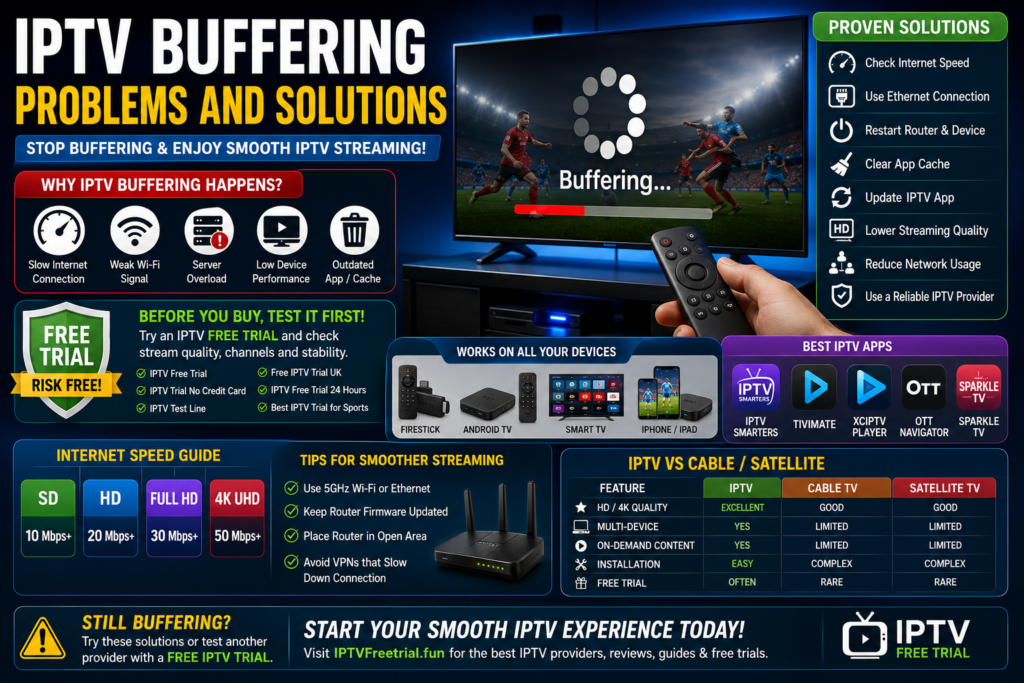
Why Does IPTV Buffer?
Buffering rarely has a single cause. In most cases, several factors combine to affect streaming quality.
1. Slow Internet Connection
If your broadband speed isn’t sufficient for HD or 4K streaming, buffering becomes much more likely.
2. Poor Wi-Fi Signal
Weak wireless coverage, interference, or long distances between your router and streaming device can interrupt data transmission.
3. Overloaded IPTV Servers
Some IPTV providers experience heavy traffic during major sporting events such as Premier League matches, increasing the likelihood of buffering.
4. Low-Performance Streaming Device
Older streaming devices may struggle to decode modern high-bitrate video streams.
5. Outdated IPTV App
Running an outdated version of your IPTV application can result in playback bugs and compatibility issues.
6. Full Device Storage
Limited available storage may reduce your device’s overall performance.
7. Background Downloads
Large downloads or cloud backups running on your network consume valuable bandwidth.
8. Incorrect IPTV Player Settings
Improper buffer settings or incompatible video decoders may affect playback.
9. ISP Network Congestion
Internet speeds often slow during peak evening hours due to increased demand.
10. Poor IPTV Provider Quality
Not every IPTV provider delivers reliable streams. This is why using an IPTV free trial or IPTV free trial 24 hours is highly recommended before purchasing a long-term subscription.
How Test IPTV Service Before Buying
A trial period helps you identify buffering issues before committing to a paid IPTV subscription.
During your IPTV trial, check:
- Live sports performance
- HD and 4K playback
- Channel loading speed
- Audio synchronisation
- Picture quality
- Channel stability during peak hours
A reliable provider should deliver consistent performance throughout the trial period.
Recommended Internet Speeds
| Streaming Quality | Recommended Speed |
|---|---|
| SD | 10 Mbps |
| HD | 20 Mbps |
| Full HD | 30 Mbps |
| 4K UHD | 50 Mbps+ |
Remember that multiple users sharing the same connection will require additional bandwidth.
Device Compatibility
Choosing the right hardware also plays a major role in reducing IPTV buffering.
Firestick
The Amazon Fire TV Stick 4K offers excellent IPTV compatibility while remaining affordable.
Android TV
Android TV devices work exceptionally well with IPTV Smarters, TiviMate, XCIPTV, and OTT Navigator.
Smart TVs
Samsung, LG, Sony, Philips, TCL, and Hisense Smart TVs all support IPTV apps capable of smooth streaming.
iPhone & iPad
iOS users can stream IPTV using compatible applications designed for Apple devices.
See our IPTV Devices category for detailed device recommendations.
Best IPTV Apps for Stable Streaming
- IPTV Smarters Pro
- TiviMate
- XCIPTV
- OTT Navigator
- Sparkle TV
- Perfect Player
Each app provides reliable playback when configured correctly and paired with a quality IPTV provider.
15 Proven IPTV Buffering Solutions
If your IPTV keeps buffering, don’t immediately assume your IPTV provider is at fault. In many cases, buffering disappears after making only a few simple changes.
1. Restart Your Streaming Device
A quick reboot clears temporary memory and closes background processes that may affect IPTV performance.
2. Restart Your Router
Power off your router for 30 seconds before turning it back on. This refreshes your internet connection and often improves streaming stability.
3. Use an Ethernet Connection
Whenever possible, connect your Firestick (using an Ethernet adapter), Android TV box, or Smart TV directly to your router. Wired connections are generally faster and more stable than Wi-Fi.
4. Upgrade Your Internet Speed
If several people in your home stream videos, play online games, or download large files simultaneously, consider upgrading your broadband package.
5. Reduce Network Traffic
- Pause large downloads.
- Stop cloud backups during streaming.
- Disconnect unused devices from Wi-Fi.
6. Update Your IPTV App
Install the latest version of your IPTV app to benefit from bug fixes, improved codec support, and better performance.
7. Clear App Cache
Over time, IPTV apps accumulate cached data that may slow performance. Clearing the cache can improve responsiveness without affecting your playlist.
8. Free Up Device Storage
Delete unused apps and unnecessary files to ensure your streaming device has enough available storage.
9. Lower the Streaming Quality
If your internet struggles with 4K playback, switching temporarily to Full HD or HD may eliminate buffering.
10. Check IPTV Server Status
If only one channel buffers while others work normally, the issue may be with the provider’s server rather than your setup.
11. Use the Correct Video Decoder
Many IPTV apps allow you to switch between hardware and software decoding. Testing both options may improve playback.
12. Keep Your Device Updated
Install the latest firmware updates for your Firestick, Android TV, Smart TV, IPTV Buffering Problems or streaming box.
13. Improve Wi-Fi Coverage
- Move the router closer.
- Use a Wi-Fi 6 router.
- Reduce interference from other wireless devices.
14. Test Another IPTV App
Sometimes a different IPTV player performs better with your provider. IPTV Smarters, TiviMate, XCIPTV, and OTT Navigator are all excellent options.
15. Try an IPTV Free Trial from Another Provider
If buffering continues despite troubleshooting, request an IPTV free trial, free IPTV trial UK, or IPTV test line from another provider. Comparing services is often the quickest way to identify whether the problem lies with your current IPTV service.
Firestick Buffering Solutions
Firestick is one of the most popular IPTV devices, but a few optimisations can significantly improve performance.
- Restart Firestick regularly.
- Clear IPTV app cache.
- Remove unused applications.
- Keep Fire OS updated.
- Use a reliable power adapter.
- Connect via Ethernet if possible.
Need more setup tips? Visit our IPTV Guides.
IPTV Smarters Buffering Fixes
If you’re using IPTV Smarters Pro, try the following:
- Update the application.
- Refresh playlists.
- Clear cache.
- Switch decoder settings.
- Restart the app after major updates.
Router Optimisation Tips
Your router plays a crucial role in IPTV streaming quality.
- Position it in a central location.
- Use the 5 GHz Wi-Fi band where available.
- Enable Quality of Service (QoS) if supported.
- Restart the router periodically.
- Replace very old networking equipment.
IPTV vs Cable TV Performance
| Feature | IPTV | Cable TV |
|---|---|---|
| Picture Quality | HD / 4K | HD |
| Multi-device Support | Excellent | Limited |
| Free Trial | Often Available | Rare |
| Requires Internet | Yes | No |
IPTV vs Satellite TV
- No satellite dish required.
- Works on multiple devices.
- Supports on-demand content.
- Portable while travelling.
- Easy software updates.
Security and Privacy Tips
- Choose reputable IPTV providers.
- Download IPTV apps only from trusted sources.
- Keep devices and apps updated.
- Use strong passwords.
- Secure your Wi-Fi network.
- Review provider privacy policies.
Frequently Asked Questions
Why does IPTV buffer even with fast internet?
Buffering can also be caused by overloaded IPTV servers, weak Wi-Fi, outdated apps, IPTV Buffering Problems or device performance issues.
Does Firestick cause IPTV buffering?
Usually not. Most buffering problems are related to internet quality, provider performance, or device settings rather than the Firestick itself.
Can changing IPTV apps reduce buffering?
Yes. Different IPTV players handle buffering and video decoding differently, so switching apps can improve playback.
Should I always use an IPTV free trial?
Yes. An IPTV free trial allows you to evaluate channel quality, reliability, and buffering performance before purchasing a subscription.
What internet speed is best for IPTV?
At least 20 Mbps for HD streaming and 50 Mbps or more for reliable 4K IPTV streaming.
Is Ethernet better than Wi-Fi?
Yes. Ethernet connections provide lower latency and greater stability, IPTV Buffering Problems making them ideal for IPTV.
Does IPTV work on Smart TVs?
Yes. Samsung, LG, Sony, TCL, Philips, and Hisense Smart TVs all support compatible IPTV apps.
Can I get an IPTV trial without a credit card?
Many providers offer an IPTV trial no credit card to new customers.
How long do IPTV free trials last?
Most providers offer an IPTV free trial 24 hours, while some provide longer evaluation periods.
Is IPTV legal?
IPTV technology is legal. Users should ensure they choose providers that have the appropriate rights to distribute the content they offer.
Final Thoughts
IPTV buffering can be frustrating, but it is often easy to resolve. By improving your internet connection, optimising your streaming device, updating your IPTV app, and choosing a reliable IPTV provider, you can enjoy smoother live TV, sports, movies, and entertainment.
Before purchasing a long-term IPTV subscription, always take advantage of an IPTV free trial, best IPTV free trial, IPTV Buffering Problems or IPTV test line. Testing the service first allows you to assess streaming quality, IPTV Buffering Problems channel availability, and overall reliability while avoiding providers that struggle during peak viewing hours.
For more IPTV setup tutorials, device reviews, troubleshooting guides, and streaming tips, visit the IPTVFreeTrial.fun homepage and explore our IPTV Reviews & Comparisons section.